
Scalable Web Scraping at Scale: A Serverless Lambda Architecture
2026-02-11
1. Introduction
In the age of big data, scraping millions of URLs efficiently while avoiding rate limits and detection remains a significant engineering challenge. This article details our production-grade serverless web scraping system that leverages AWS Lambda to process thousands of URLs concurrently while maintaining reliability and stealth.
1.1 The Challenge
We needed to:
- Process millions of URLs from various sources (sitemaps, parquet files)
- Download and store media (images/videos) to S3
- Maintain high throughput without overwhelming target servers
- Avoid bot detection with sophisticated anti-detection mechanisms
- Track progress reliably with PostgreSQL persistence
- Handle failures gracefully with retry mechanisms and circuit breakers
1.2 The Solution
We built a distributed orchestration system using:
- Master Coordinator (Python) - Running on EC2/local machine
- Lambda Workers (Python & Node.js) - Ephemeral compute for scraping
- PostgreSQL - State persistence and tracking
- S3 - Media storage and data source
- Concurrent Processing - Up to 40+ concurrent Lambda executions
2. Architecture Overview
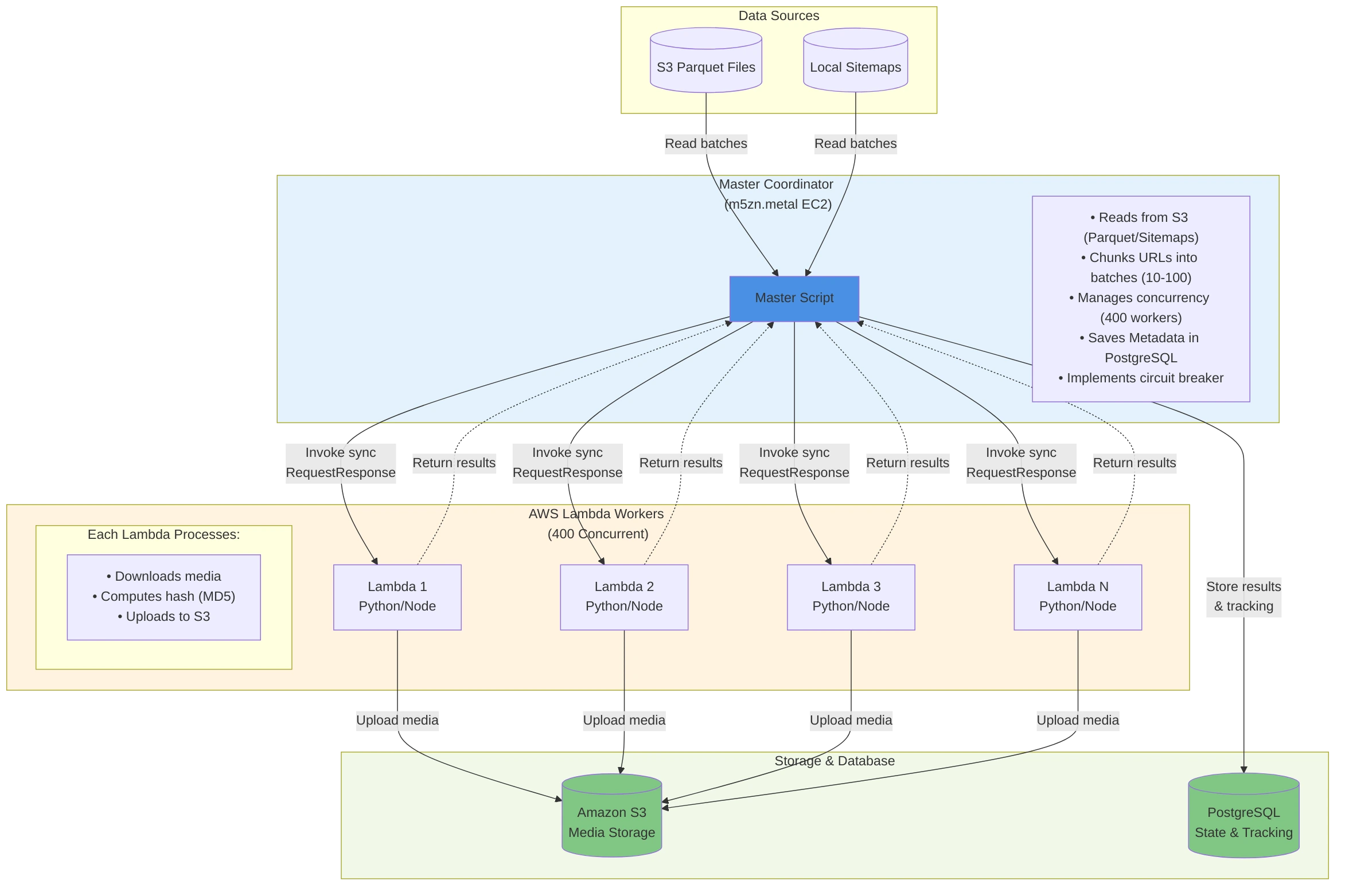
2.1 Key Design Principles
- Stateless Workers: Lambda functions are ephemeral and stateless
- Centralized State: PostgreSQL maintains all processing state
- Graceful Degradation: Circuit breakers prevent cascading failures
- Horizontal Scaling: Easy to increase throughput by adjusting concurrency
- Efficient Resource Usage: Pay only for actual processing time
3. System Components
3.1 Master Coordinator (master.py)
The orchestration layer that:
- Discovers data sources (S3 parquet files or local sitemaps)
- Manages batch processing with configurable batch sizes
- Invokes Lambda functions synchronously using
ThreadPoolExecutor - Tracks progress in PostgreSQL with atomic updates
- Implements circuit breaker after N consecutive failures
- Manages checkpoints for resume capability
Key Configuration (where to look):
- Batch sizing + concurrency + circuit breaker thresholds live at the top of the master scripts:
normal-scraping/master.pychromium-scraping/master.py
- Typical knobs:
ITEMS_PER_LAMBDA_BATCH,MAX_CONCURRENT_LAMBDAS,MAX_CONSECUTIVE_FAILED_BATCHES,CHECKPOINT_UPDATE_INTERVAL, plus env vars likeSITE_NAME,LAMBDA_FUNCTION_NAME, and the PostgreSQL connection settings.
3.2 Lambda Workers
Two implementations for different use cases:
3.2.1 Python Lambda (normal-scraping/lambda/lambda.py)
- HTTP-based scraping with
requestslibrary - Advanced anti-detection (dynamic User-Agents, headers)
- Multiple retry strategies with exponential backoff
- Image/video downloading with content-type detection
- MD5 hashing for deduplication
- Direct S3 upload from
/tmp
3.2.2 Node.js Lambda (chromium-scraping/lambda/app.js)
- Browser-based scraping with Playwright/Chromium
- Full page screenshot capture
- JavaScript-rendered content support
- Headless browser automation
- S3 upload of screenshots
3.3 PostgreSQL Database
PostgreSQL is used for state persistence and tracking:
- Items Table: Stores processed items with URLs, status, and full result metadata (including S3 object URLs/keys, hashes, sizes, timestamps, and error details)
- Batch Tracking Table: Tracks batch execution status and batch-level statistics (processed/success/error counts, durations, etc.)
4. Installation & Setup
4.1 Prerequisites
- AWS Account with Lambda, S3, and appropriate IAM permissions
- Python 3.9+ (for master coordinator and Python Lambda)
- Node.js 18+ (for Chromium Lambda)
- PostgreSQL 12+ (local or RDS)
- Docker (for building Lambda container images)
- AWS CLI configured with credentials
4.2 Environment Setup
4.2.1 PostgreSQL Database Setup
# Install PostgreSQL (macOS)
brew install postgresql@14

# Start PostgreSQL service
brew services start postgresql@14

# Create database
createdb scraping_db

# Set environment variables
export POSTGRES_HOST=localhost
export POSTGRES_PORT=5432
export POSTGRES_DB=scraping_db
export POSTGRES_USER=postgres
export POSTGRES_PASSWORD=yourpassword
The PostgreSQL database will store items and batch tracking information. Tables should include:
- Items table with URL tracking, status, and metadata
- Batch tracking table for monitoring execution progress
- Appropriate indexes for query performance
4.2.2 AWS Configuration
# Configure AWS CLI
aws configure

# Create S3 buckets
aws s3 mb s3://your-image-bucket --region us-east-1
aws s3 mb s3://your-data-bucket --region us-east-1

# Set environment variables
export S3_IMAGE_BUCKET=your-image-bucket
export S3_PARQUET_BUCKET=your-data-bucket
export S3_IMAGE_PREFIX=images/
export S3_PARQUET_PREFIX=data/
export AWS_REGION=us-east-1
5. Approach 1: Normal Scraping (Python)
5.1 Overview
The Python-based approach uses pure HTTP requests for scraping, making it lightweight and fast. Ideal for downloading images/videos from direct URLs without JavaScript rendering requirements.
5.2 Installation
5.2.1 Step 1: Install Python Dependencies
cd normal-scraping/lambda

# Create virtual environment (optional but recommended)
python3 -m venv venv
source venv/bin/activate  # On Windows: venv\Scripts\activate

# Install dependencies
pip install boto3 requests psycopg2-binary
5.2.2 Step 2: Create Lambda Deployment Package
# Create package directory
mkdir package
cd package

# Install dependencies in package directory
pip install --target . boto3 requests urllib3

# Add lambda function
cp ../lambda.py .

# Create deployment ZIP
zip -r ../lambda-deployment.zip .
cd ..
5.2.3 Step 3: Create Lambda Function via AWS CLI
# Create IAM role for Lambda (if not exists)
aws iam create-role \
  --role-name lambda-scraper-role \
  --assume-role-policy-document '{
    "Version": "2012-10-17",
    "Statement": [{
      "Effect": "Allow",
      "Principal": {"Service": "lambda.amazonaws.com"},
      "Action": "sts:AssumeRole"
    }]
  }'

# Attach policies
aws iam attach-role-policy \
  --role-name lambda-scraper-role \
  --policy-arn arn:aws:iam::aws:policy/service-role/AWSLambdaBasicExecutionRole

aws iam attach-role-policy \
  --role-name lambda-scraper-role \
  --policy-arn arn:aws:iam::aws:policy/AmazonS3FullAccess

# Create Lambda function
aws lambda create-function \
  --function-name normal-scraper \
  --runtime python3.9 \
  --role arn:aws:iam::YOUR_ACCOUNT_ID:role/lambda-scraper-role \
  --handler lambda.lambda_handler \
  --zip-file fileb://lambda-deployment.zip \
  --timeout 300 \
  --memory-size 512 \
  --environment Variables="{
    S3_IMAGE_BUCKET=your-image-bucket,
    S3_IMAGE_PREFIX=images/,
    AWSS3_REGION=us-east-1
  }"
5.2.4 Step 4: Setup Master Coordinator
cd ..  # Back to normal-scraping directory

# Install master dependencies
pip install boto3 psycopg2-binary pandas pyarrow

# Set environment variables
export SITE_NAME=my_scraping_project
export LAMBDA_FUNCTION_NAME=normal-scraper
export POSTGRES_HOST=localhost
export POSTGRES_DB=scraping_db
export POSTGRES_USER=postgres
export POSTGRES_PASSWORD=yourpassword
export S3_PARQUET_BUCKET=your-data-bucket
export S3_PARQUET_PREFIX=data/

# Run the master coordinator
python master.py
5.3 How Python Lambda Works
At a high level, each Python Lambda invocation:
- Receives a
batch_idand anitems_to_processlist (each item carries at leastpage_urlandimage_url). - Applies polite, randomized delays + browser-like request headers.
- Downloads media, computes hashes for dedupe/traceability, uploads to S3, and returns per-item results.
- The master process persists results and batch state into PostgreSQL and updates checkpoints.
For full implementation details (kept out of this post to avoid duplicating repo code):
normal-scraping/lambda/lambda.py(worker logic)normal-scraping/master.py(batching, concurrency, checkpointing, persistence)
6. Approach 2: Chromium Scraping (Node.js)
6.1 Overview
The Node.js approach uses Playwright with Chromium for browser-based scraping. This is necessary when:
- JavaScript rendering is required
- You need screenshots of pages
- Content is loaded dynamically via AJAX
- Anti-bot measures require real browser behavior
6.2 Installation
6.2.1 Step 1: Prepare Lambda Container
cd chromium-scraping/lambda

# Ensure Docker is running
docker --version

# Build the Docker image
docker build -t chromium-lambda:latest .
The Dockerfile installs:
- Amazon Linux 2 base image optimized for Lambda
- System dependencies for Chromium (GTK, X11, NSS, etc.)
- Node.js dependencies (Playwright, AWS SDK)
- Chromium browser binary
6.2.2 Step 2: Push to Amazon ECR
# Authenticate Docker to ECR
aws ecr get-login-password --region us-east-1 | \
  docker login --username AWS --password-stdin \
  YOUR_ACCOUNT_ID.dkr.ecr.us-east-1.amazonaws.com

# Create ECR repository
aws ecr create-repository \
  --repository-name chromium-scraper \
  --region us-east-1

# Tag and push image
docker tag chromium-lambda:latest \
  YOUR_ACCOUNT_ID.dkr.ecr.us-east-1.amazonaws.com/chromium-scraper:latest

docker push \
  YOUR_ACCOUNT_ID.dkr.ecr.us-east-1.amazonaws.com/chromium-scraper:latest
6.2.3 Step 3: Create Lambda Function from Container
# Create Lambda function using container image
aws lambda create-function \
  --function-name chromium-scraper \
  --package-type Image \
  --code ImageUri=YOUR_ACCOUNT_ID.dkr.ecr.us-east-1.amazonaws.com/chromium-scraper:latest \
  --role arn:aws:iam::YOUR_ACCOUNT_ID:role/lambda-scraper-role \
  --timeout 300 \
  --memory-size 2048 \
  --environment Variables="{
    S3_BUCKET_NAME=your-image-bucket,
    S3_FOLDER=scraped_data
  }"

# Update Lambda configuration for container workloads
aws lambda update-function-configuration \
  --function-name chromium-scraper \
  --ephemeral-storage Size=2048
6.2.4 Step 4: Setup Master Coordinator
cd ..  # Back to chromium-scraping directory

# Install dependencies
pip install boto3 psycopg2-binary

# Set environment variables
export SITE_NAME=chromium_scraping_project
export LAMBDA_FUNCTION_NAME=chromium-scraper
export POSTGRES_HOST=localhost
export POSTGRES_DB=scraping_db
# ... other environment variables

# Run master coordinator
python master.py
6.3 How Chromium Lambda Works
At a high level, each Chromium (Playwright) Lambda invocation:
- Receives a
batch_idand anitems_to_processlist (URLs or small objects containingpage_url). - Launches Chromium with stability-focused flags and reuses a single browser context per invocation.
- Navigates to each page, captures artifacts (e.g., screenshots), uploads to S3, and returns per-item results.
For full implementation details (kept out of this post to avoid duplicating repo code):
chromium-scraping/lambda/app.jschromium-scraping/lambda/Dockerfilechromium-scraping/lambda/package.jsonchromium-scraping/master.py
7. How It Works: Deep Dive
7.1 Master Coordinator Workflow
The master coordinator is intentionally simple:
- Initialize local directories + database connection pool.
- Discover input data (S3 parquet files for “normal” mode, local sitemaps for “chromium” mode).
- Resume from checkpoints (so the run is restartable).
- Chunk items into batches and invoke Lambda concurrently via synchronous
RequestResponsecalls. - Persist per-batch and per-item results to PostgreSQL and periodically update checkpoints.
Implementation lives in the master scripts (this post avoids duplicating repo code):
normal-scraping/master.pychromium-scraping/master.py
8. Anti-Detection Mechanisms
One of the critical challenges in web scraping at scale is avoiding detection and rate limiting. Our system implements multiple layers of anti-detection technology.
8.1 Dynamic User-Agent Generation
Instead of using a static User-Agent string, we rotate realistic browser signatures (with sensible distributions across browser families and OSes) and keep versions “believable”.
Key Features:
- Weighted randomization matches real browser distribution
- Version numbers stay current with actual browser releases
- OS/browser combinations are realistic (no Firefox on iOS, etc.)
- Fallback to known-good User-Agents if generation fails
8.2 Enhanced HTTP Headers
We send browser-like headers (not just a UA), with realistic Accept / Accept-Language patterns, sensible Referer behavior, and minor randomization to reduce “bot fingerprinting”.
8.3 Multi-Strategy Download with Fallbacks
When downloads fail, we try a small set of progressively simpler strategies (full header mimicry → simplified headers → minimal request) with backoff on 429s and careful handling of 403s.
8.4 Smart Rate Limiting
We introduce human-like jitter between requests (including occasional longer pauses) to reduce velocity-based detection.
Benefits:
- Mimics human browsing patterns
- Reduces server load detection
- Random variation prevents pattern recognition
- Occasional longer pauses simulate user behavior
8.5 Session Management
We use persistent HTTP sessions with retry/backoff and connection pooling to keep performance stable and reduce handshake overhead.
Source of truth for the anti-detection implementation:
normal-scraping/lambda/lambda.py
9. Performance & Optimization
9.1 Production Infrastructure
Master Coordinator:
- Instance Type: AWS m5zn.metal EC2
- Specs: 48 vCPUs, 192 GB RAM, 100 Gbps network
- Concurrent Lambda Invocations: 400 simultaneous executions
- Database: PostgreSQL with connection pooling (400+ connections)
Why m5zn.metal?
- High network bandwidth (100 Gbps) critical for managing 400 concurrent Lambda invocations
- Sufficient CPU cores to handle ThreadPoolExecutor with 400 workers
- Large memory for in-memory batch queuing and result aggregation
- Low latency network performance for Lambda invocations and database operations
9.2 Lambda Configuration Tuning
9.2.1 Python Lambda (Normal Scraping)
- Memory: 512 MB
- Timeout: tune to your runtime distribution (example: if most invocations complete in ~50s, cap at ~90s)
- Ephemeral Storage: 512 MB (default)
- Concurrent Executions: 400
- Cold Start Time: ~1 second
Rationale:
- 512 MB provides sufficient memory for HTTP requests and file buffering
- Timeout should be long enough for the “normal” case, but not so long that broken/blocked targets burn money for minutes
- Low memory footprint for efficient scaling
- Minimal cold start overhead (~1 second)
9.2.2 Node.js/Chromium Lambda (Browser Scraping)
- Memory: 2048 MB
- Timeout: tune to your runtime distribution (keep a buffer, but avoid multi-minute timeouts unless you truly need them)
- Ephemeral Storage: 2048 MB
- Concurrent Executions: 400
- Cold Start Time: 7-8 seconds
Rationale:
- Higher memory needed for Chromium browser
- More storage for browser cache and screenshots
- Higher concurrency possible with proper tuning
- Longer cold starts due to Chromium initialization
9.3 Real-World Performance Metrics
9.3.1 Python Lambda (Normal Scraping) - Production Data
Typical Performance:
- Items per Lambda: ~60 images
- Execution Time: ~30 seconds
- Throughput: ~2 images/second per Lambda
- Total Throughput: 800 images/second (400 concurrent Lambdas)
Performance Characteristics:
- Cold Start: ~1 second
- Download Time: 0.3–2 seconds per image (varies by size)
- S3 Upload: 0.1–0.5 seconds per image
- Processing: 0.05–0.1 seconds per image
- Total/Item: ~0.5 seconds average
9.3.2 Chromium Lambda (Playwright Scraping) - Production Data
Typical Performance:
- Pages per Lambda: 4–5 pages
- Execution Time: ~50 seconds
- Throughput: ~0.1 pages/second per Lambda
- Total Throughput: 40 pages/second (400 concurrent Lambdas)
Performance Characteristics:
- Cold Start: 7–8 seconds (Chromium initialization)
- Page Navigation: 2–8 seconds (depends on site complexity)
- JavaScript Execution: 1–5 seconds (varies by page)
- Screenshot Capture: 0.5–2 seconds (depends on page size)
- S3 Upload: 0.5–1 second per screenshot
- Total/Page: ~10 seconds average
Important Note: Scraping time is highly dependent on website characteristics:
- Simple static pages: 3–5 seconds
- JavaScript-heavy SPAs: 8–15 seconds
- Sites with CAPTCHA/anti-bot: 20–30 seconds (or failure)
- Pages with lazy loading: 10–20 seconds
- Complex navigation flows: 15–30 seconds
- Slow backend responses: Up to timeout
9.3.3 What Actually Moved the Needle: Batch Size + Timeout Calibration
For this architecture, performance and reliability mostly came down to two knobs:
- Batch size per Lambda
- Cold start is a mostly fixed cost per invocation, so very small batches waste a larger fraction of runtime on overhead.
- But batch size that’s too large increases velocity, which increases the chance of 429s (and sometimes 403s), causing retries and net lower throughput.
- The sweet spot was found by approximating a reasonable batch size ahead of time, then testing extensively across a range of batch sizes until we found the largest batch that stayed comfortably under 429 thresholds.
In our tuned workloads, that approach drove the rate-limit / batch-failure rate down to almost zero (on the order of ~0.0001% in steady-state runs). The exact numbers will vary by site and time-of-day, so treat this as a method rather than a universal constant.
- Lambda timeout
- Avoid the default “set it to 5 minutes and forget it” approach.
- If most invocations complete in ~50 seconds, a ~90 second cap (≈1.5× typical high runtime) is often a better tradeoff than a multi-minute timeout.
- When an invocation runs far past the normal tail, it’s frequently due to target website issues (hangs, stalls, WAF behavior) where waiting longer is not productive.
- Lower timeouts also reduce wasted spend: a stuck Lambda that runs minutes at high concurrency can inflate cost quickly.
Practical workflow:
- Run a sweep of batch sizes (and, if needed, per-domain caps) while tracking 429/403 rates.
- Choose the largest batch size that keeps 429/403 acceptably low.
- Measure invocation runtime distribution and set timeout close to the normal tail (with a buffer), rather than “maximum possible”.
9.4 Concurrency Scaling (No Charts, Just Constraints)
Concurrency generally scales well until you hit one of these limits:
- Target-side rate limiting (429) or blocking (403)
- AWS account concurrency/throttling limits
- Master coordinator bottlenecks (network bandwidth, thread scheduling)
- PostgreSQL capacity (connections, write throughput, indexes)
The operational pattern is: scale up gradually, watch 429/403 and overall processing latency, then stop increasing concurrency once you see diminishing returns or rising error rates.
9.5 Database Connection Pooling
The master coordinator uses a threaded PostgreSQL connection pool sized to your concurrency (plus a small buffer). See the database initialization in each master.py.
Benefits:
- Reuses connections across threads
- Prevents connection exhaustion
- Reduces database overhead
9.6 S3 Upload Optimization
For larger payloads, multipart uploads and controlled concurrency keep S3 throughput high. In practice, the defaults plus upload_fileobj are often sufficient; optimize only after measuring.
10. Monitoring & Error Handling
10.1 Error Classification
We map common HTTP and network failures to stable status codes (e.g., 403/404/429/410), so dashboards and retries can be driven by categories rather than raw exceptions.
10.2 Real-Time Terminal Dashboard
In practice, we monitor runs directly from the master coordinator: it includes a robust, real-time CLI dashboard that shows progress, throughput, and the most common failure categories as the job runs.
This keeps the feedback loop tight during tuning (batch size, concurrency, timeouts) without requiring a separate database dashboard.
10.3 CloudWatch Metrics
We rely on CloudWatch for Lambda-level telemetry (Invocations, Errors, Duration, Throttles). When something looks off in the terminal dashboard (spikes in 429/403, timeouts, etc.), CloudWatch is the next stop for drill-down.
10.4 Circuit Breaker Implementation
The master uses a simple circuit breaker: if too many consecutive batches fail, it stops dispatching more work. This prevents runaway retries, protects the DB, and reduces the chance of burning through a target site’s rate limits.
Purpose:
- Prevents cascading failures
- Stops execution when Lambda consistently fails
- Protects database and target servers
- Allows for manual intervention
10.5 Checkpoint & Resume
Checkpoint files (local JSON) store enough state to resume after interruptions. The exact format is intentionally simple and lives in each master.py.
11. Lessons Learned
11.1 Lambda Cold Starts Matter
Problem: Initial Lambda invocations took 3-5 seconds longer than subsequent ones due to cold starts.
Solution:
- Pre-warm Lambdas using CloudWatch Events
- Keep concurrent invocations high to maintain warm instances
- Accept some cold start overhead (1s for Python, 7-8s for Chromium)
11.2 Database Connection Pool Sizing
Problem: Initial implementation created new database connections for each batch, leading to connection exhaustion.
Solution: Use a shared connection pool sized to match your concurrency (plus a small buffer), rather than creating new DB connections per batch.
11.3 Handling Lambda Timeouts
Problem: Overly large timeouts can waste spend when targets hang or stall, and overly small timeouts can drop progress if you don’t return partial results.
Solution: Right-size the timeout to your workload (often close to the normal tail with a buffer, e.g. ~1.5× a typical “high” runtime), and always check remaining runtime to stop early and return partial results.
This ensures partial batch results are still returned and processed.
11.4 Rate Limiting is Real
Some websites implemented aggressive rate limiting:
Observable Patterns:
- 429 errors after ~50 requests from same IP
- Temporary IP bans (15-30 minutes)
- CAPTCHAs triggered by high request velocity
Mitigations:
- Smart delays between requests (0.5-2 seconds)
- Rotate between multiple Lambda IPs naturally
- Reduce concurrent Lambda count for sensitive targets
- Implement exponential backoff on 429 errors
11.5 PostgreSQL Performance
Problem: Database became bottleneck at high concurrency.
Solutions:
- Added indexes on frequently queried columns
- Used
ON CONFLICTfor upsert operations (avoid duplicate queries) - Batched database writes where possible
- Used connection pooling
11.6 Error Handling Granularity
Initially, we had generic error handling. Moving to specific error codes (403/404/429/etc.) improved debugging significantly and enabled targeted retry/backoff behavior.
This allowed us to:
- Identify systematic issues (e.g., all 403 errors from specific domain)
- Implement targeted retry logic
- Generate actionable reports
12. Conclusion
12.1 Key Achievements
✅ Scalability: Process millions of URLs with linear scaling
✅ High Throughput: High parallelism via Lambda concurrency, tuned by batch sizing
✅ Reliability: Extremely low error rates after batch-size calibration + careful retry/backoff
✅ Flexibility: Two approaches for different use cases
✅ Observability: Comprehensive tracking and monitoring
✅ Resumability: Checkpoint-based recovery from interruptions
12.2 When to Use This Architecture
Ideal For:
- Large-scale web scraping projects (1M+ URLs)
- Media downloading and archiving
- Periodic data extraction jobs
- High-throughput scraping requirements
- Workloads with variable demand
Not Ideal For:
- Small-scale projects (<10K URLs, use simple scripts)
- Projects requiring IP consistency (Lambda IPs rotate)
12.3 Future Enhancements
- Auto-Scaling: Dynamically adjust concurrency based on load
- ML-Based Anti-Detection: Use ML to generate even more realistic browser signatures
- Proxy Integration: Route requests through proxy pools for IP rotation
- WebSocket Support: Handle WebSocket connections for real-time data
- Distributed Master EC2s: Multiple EC2s running concurrently to process even more.
12.4 Final Thoughts
Building a production-grade scraping system requires careful consideration of:
- Technical challenges (rate limiting, detection, errors)
- Infrastructure scaling (Lambda concurrency, network bandwidth, database)
- Operational concerns (monitoring, debugging, maintenance)
- Ethical considerations (respecting robots.txt, rate limits)
This architecture has proven effective for processing over 50 million URLs across multiple projects, maintaining reliability at scale. The combination of serverless compute, smart error handling, and comprehensive monitoring creates a robust foundation for large-scale data extraction.
12.5 Resources & References
- AWS Lambda Documentation: https://docs.aws.amazon.com/lambda/
- Playwright Documentation: https://playwright.dev/
- Requests Best Practices: https://requests.readthedocs.io/
- PostgreSQL Performance Tuning: https://wiki.postgresql.org/wiki/Performance_Optimization