
Building a High-Performance Synthetic Image Generation Pipeline: A Deep Dive
2026-02-12
How we built a scalable image generation system that creates millions of aesthetic quote images for training vision-language models
The Challenge
We needed synthetic training data at scale. Millions of quote images for training vision-language models. Not just any images—they had to be aesthetically pleasing, typographically sound, and diverse enough to represent real-world design variations.
The constraints were clear:
- Scale: Millions of images with reasonable infrastructure costs
- Quality: Professional typography and WCAG-compliant color theory
- Speed: High throughput to minimize generation time
- Diversity: Thousands of combinations of fonts, colors, effects, and layouts
This is the story of building that pipeline.
System Architecture
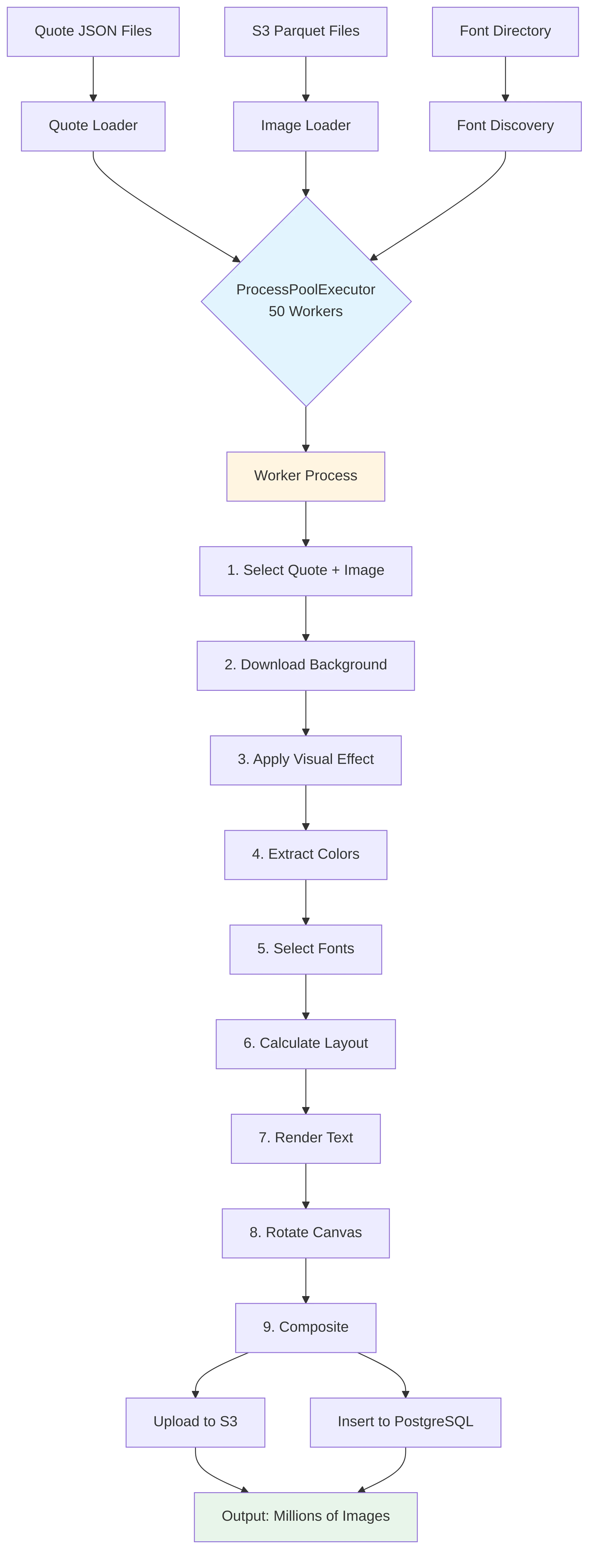
The Architecture: Parallel Processing at Scale
The core insight was simple: image generation is CPU-bound, embarrassingly parallel work. Each image is independent. So we threw hardware at it.
ProcessPoolExecutor(max_workers=50)
Fifty parallel worker processes. Each one generating images independently. The result? ~18 images per second on our production hardware.
Let's do the math:
- 18 images/second × 3,600 seconds = 64,800 images/hour
- 64,800 images/hour × 24 hours = 1.5M+ images/day
This throughput allows us to generate millions of training images in days rather than weeks.
The Foundation: Getting Typography Right
Here's a dirty secret about text rendering: most people get it wrong. They use character counts to wrap text. "Wrap after 40 characters." Simple, right?
Wrong.
The Problem with Character-Based Wrapping
This looks reasonable
"The quick brown fox" # 19 characters
But this is also 19 characters
"WWWWWWWWWWWWWWWWWWW" # Way wider!
With variable-width fonts (which is what we use for aesthetic appeal), the letter 'W' is nearly 4× wider than 'i'. Character counting is fundamentally broken.
The Solution: Pixel-Perfect Wrapping
We measure the actual rendered width in pixels:
def wrap_text_by_pixel_width(text, font, max_width):
    lines = []
    words = text.split()
    current_line = words[0]

    for word in words[1:]:
        # Measure actual pixel width
        if font.getlength(current_line + ' ' + word) <= max_width:
            current_line += ' ' + word
        else:
            lines.append(current_line)
            current_line = word

    lines.append(current_line)
    return lines
This handles every font family correctly, from ultra-condensed to extra-wide display fonts.
Color Theory: Making Text Readable
Pretty images are worthless if you can't read the text. This is where color science becomes critical.
WCAG 2.0 Luminance
The Web Content Accessibility Guidelines (WCAG) define how to calculate the perceived brightness of colors. It's not just averaging RGB values—human eyes are more sensitive to green than red, and more sensitive to red than blue.
def get_relative_luminance(rgb):
    r, g, b = [x / 255.0 for x in rgb]

    # Apply gamma correction (this is the key part)
    r = ((r / 12.92) if r <= 0.03928 else ((r + 0.055) / 1.055) ** 2.4)
    g = ((g / 12.92) if g <= 0.03928 else ((g + 0.055) / 1.055) ** 2.4)
    b = ((b / 12.92) if b <= 0.03928 else ((b + 0.055) / 1.055) ** 2.4)

    # Weighted sum (green is most important)
    return 0.2126 * r + 0.7152 * g + 0.0722 * b
Notice the weights: 21% red, 71% green, 7% blue. This matches human vision.
Contrast Ratio
Once we have luminance, we calculate contrast ratio:
def get_contrast_ratio(color1, color2):
    lum1 = get_relative_luminance(color1)
    lum2 = get_relative_luminance(color2)

    lighter = max(lum1, lum2)
    darker = min(lum1, lum2)

    return (lighter + 0.05) / (darker + 0.05)
WCAG requires 4.5:1 for body text. We enforce this for every image.
The Color Strategy
For maximum readability with visual variety, we use a distribution:
- 90% black/white text on regular images (pure readability)
- 10% ColorThief accents (extracted from the image itself)
- Special handling for glassmorphism and darkened variants (3 vibrant accents)
This ensures 9 out of 10 images are maximally readable, while 1 in 10 is more artistic.
Extracting Colors from Images
We use K-means clustering to find dominant colors:
def get_color_thief_palette(image, num_colors=6):
    # Resize for speed
    resized = image.resize((150, 150))
    pixels = np.array(resized).reshape(-1, 3)

    # Remove extreme values (pure white/black)
    mask = np.all(pixels > 30, axis=1) & np.all(pixels < 225, axis=1)
    filtered_pixels = pixels[mask]

    # K-means clustering
    kmeans = KMeans(n_clusters=num_colors, random_state=42)
    kmeans.fit(filtered_pixels)
    colors = kmeans.cluster_centers_.astype(int)

    # Sort by saturation (vibrant colors first)
    return sorted(colors, key=get_saturation, reverse=True)
Naming Colors
Raw hex codes aren't meaningful for metadata. We need human-readable names. Enter the color-name-api project—a fantastic open-source API that maps hex codes to creative color names.
# API call to color-name-api
api_url = f"http://localhost:8080/v1/?values={hex_string}"
response = requests.get(api_url)

# Example mappings:
# #ff6e4a → "Outrageous Orange"
# #3e82fc → "Dodger Blue"
# #9e43a2 → "Medium Purple"
We batch process colors to minimize API overhead, storing both hex codes and names in the database.
Visual Effects: From Regular to Glassmorphism
Plain backgrounds are boring. We implemented 7 different visual effects:
1. Regular (50% of images)
Clean, unfiltered backgrounds. Maximum clarity.
2. Glassmorphism (Frosted Glass Effect)
The trendy modern UI look:
def apply_glassmorphism_effect(image):
    # Double blur for extra frosted effect
    blurred = image.filter(GaussianBlur(radius=12))
    extra_blurred = blurred.filter(GaussianBlur(radius=6))

    # Semi-transparent white overlay
    white_overlay = Image.new('RGBA', image.size, (255, 255, 255, 120))

    # Subtle dark overlay for contrast
    dark_overlay = Image.new('RGBA', image.size, (0, 0, 0, 40))

    # Composite layers
    step1 = Image.alpha_composite(extra_blurred, white_overlay)
    result = Image.alpha_composite(step1, dark_overlay)

    return result
This creates that soft, translucent look popular in iOS and modern web design.
3. Darkened
Heavy 70% opacity black overlay for dramatic contrast. Perfect for bright text on any background.
4. Vignette
Mathematically smooth edge darkening using numpy:
def apply_vignette_filter(image):
    width, height = image.size
    center_x, center_y = width // 2, height // 2

    # Create coordinate grid
    x = np.arange(width)
    y = np.arange(height)
    xx, yy = np.meshgrid(x, y)

    # Calculate distance from center
    distance = np.sqrt((xx - center_x)**2 + (yy - center_y)**2)
    max_distance = np.sqrt((width/2)**2 + (height/2)**2)

    # Smooth falloff curve
    vignette_strength = np.power(distance / max_distance, 1.5)
    vignette_strength = np.clip(vignette_strength * 0.8, 0, 0.8)

    # Apply as alpha mask
    alpha_values = (vignette_strength * 255).astype(np.uint8)
    # ... composite with original
The power(1.5) creates a smooth, natural falloff that draws the eye to the center.
5-7. Tonal Filters
- High Contrast: 1.8× contrast + 1.3× saturation
- Warm Tone: Orange overlay for sunset vibes
- Cool Tone: Blue overlay for professional feel
The Layout Engine: Rotation and Alignment
Static, centered text is predictable. We want variety.
Dynamic Rotation
Text canvases rotate at 9 different angles:
ROTATION_ANGLES = [0, 20, 40, 60, 80, -20, -40, -60, -80]
The key is using high-quality resampling:
rotated_canvas = text_canvas.rotate(
    angle,
    resample=Image.Resampling.BICUBIC,  # Smooth, high quality
    expand=True  # Don't crop edges
)
BICUBIC resampling ensures sharp, anti-aliased text even at 80° angles.
Independent Alignment
Quote and title can align differently:
# Example: Centered quote, right-aligned author
quote_alignment = "center"  # or "left", "right"
title_alignment = "right"   # or "left", "center"

# Calculate position per line
if quote_alignment == "center":
    x = (canvas_width - line_width) // 2
elif quote_alignment == "right":
    x = canvas_width - line_width - margin
else:  # left
    x = margin
With 3 × 3 × 9 = 81 layout combinations (quote align × title align × rotation), we get massive visual diversity.
Smart Bold Regions
The middle third of quotes uses bold/italic fonts for emphasis:
total_lines = len(quote_lines)
bold_start = total_lines // 3
bold_end = 2 * total_lines // 3

for i, line in enumerate(quote_lines):
    font = bold_font if bold_start <= i < bold_end else regular_font
    color = accent_color if bold_start <= i < bold_end else main_color
    # ... render
This creates natural visual hierarchy.
The Data Pipeline: From Parquet to PostgreSQL
Input: S3 Images
We use S3 dataset, stored in Parquet files on S3:
def get_unsplash_parquet_files():
    s3_client = boto3.client('s3')
    response = s3_client.list_objects_v2(
        Bucket='bucket-name',
        Prefix='prefix'
    )
    return [f"s3://{bucket}/{obj['Key']}"
            for obj in response['Contents']
            if obj['Key'].endswith('.parquet')]
Each parquet file contains thousands of images with metadata:
- Image URL
- Photographer username
- Descriptions (human + AI-generated)
- Dimensions
Smart Image Rotation
To prevent reuse, we rotate through parquet files:
# Switch parquet when 80% of images are used
if len(used_images) >= len(current_images) * 0.8:
    current_parquet_index = (current_parquet_index + 1) % len(parquet_files)
    all_images = read_parquet_batch(parquet_files[current_parquet_index])
    used_images.clear()
This ensures maximum diversity across the dataset.
Output: S3 + PostgreSQL
Each generated image:
- Uploads to S3 as a 1024×1024 PNG
- Inserts metadata to PostgreSQL with full configuration
-- Example record
{
  "quote": "The only way to do great work is to love what you do.",
  "title": "Inspiration",
  "font_family": "roboto",
  "background_filter": "glassmorphism",
  "rotation_degree": 40,
  "quote_alignment": "center",
  "main_text_color_hex": "#FFFFFF",
  "main_text_color_name": "White",
  "img_id": "abc123xyz",
  "photographer_username": "johndoe",
  "s3_url": "https://s3.../image_quotes/..."
}
This metadata is gold for training—it tells the model exactly what visual parameters created each image.
Automated Captioning: Grounding Visuals in Language
Training a vision-language model requires more than just images—it needs high-quality, descriptive text pairs. We can't just say "an image of a quote." We need to describe how it looks.
The Metadata-to-Text Pipeline
Since we generate the images, we have ground-truth knowledge of every pixel. We turn this metadata into rich natural language descriptions.
1. Metadata Synthesis
Raw data isn't enough. We convert technical parameters into descriptive phrases:
- Font:
Roboto-Bold.ttf→ "a bold, geometric sans-serif typeface" - Color:
#FF5733→ "in vibrant reddish-orange" - Rotation:
20→ "with a dynamic 20° clockwise tilt"
def _prepare_parameters(row_dict):
    # Convert hex to human-readable name
    color_name = get_color_name(row_dict['main_text_color_hex'])

    # Describe the rotation
    degree = row_dict['rotation_degree']
    rotation_phrase = f"rotated {degree} degrees" if degree != 0 else "straight"

    # describe the background
    bg_phrase = create_background_description(row_dict)

    return {
        'color_phrase': f"rendered in {color_name}",
        'rotation_phrase': rotation_phrase,
        'background_desc': bg_phrase,
        # ... other parameters
    }
2. Template-Based Generation
To prevent the model from overfitting to a single sentence structure, we use a library of diverse templates for both short and long captions.
Short Caption Template:
"A quote stating '[quote]' [rotation_phrase] on [background_description]."
Long Caption Template:
"A digital design featuring the text '[quote]' set in [font_family], [color_phrase]. The background is [background_description], [filter_nuance]. The layout features [alignment] alignment [rotation_phrase]."
3. Natural Language Polishing
Template filling often leaves artifacts like double spaces or awkward punctuation. We run a final polishing pass:
def _polish_final_caption(text):
    # Remove empty template slots
    text = re.sub(r'\[[\w_]+\]', '', text)
    # Fix punctuation
    text = re.sub(r',\s*,', ',', text)
    text = re.sub(r'\s{2,}', ' ', text).strip()
    return text
The Result
Input Metadata:
- Quote: "Stay Foolish"
- Font: Playfair Display
- Color: #F0F8FF (AliceBlue)
- Effect: Glassmorphism
Generated Analysis:
"An elegant typographic composition featuring 'Stay Foolish' in Playfair Display, rendered in AliceBlue. The text floats over a glassmorphism background with soft, frosted blurs, creating a modern, high-end aesthetic."
This gives our vision model precise vocabulary for fonts, colors, and design styles.
Performance Metrics
Achieved Throughput:
- Processing rate: ~18 images/second
- Parallel workers: 50 processes
- Daily capacity: 1.5M+ images
- Visual variations: Thousands of unique combinations
- Font families: Top 100+ with multiple weights
- Background effects: 7 different filters
- Layout combinations: 81 (alignment × rotation permutations)
- Color strategies: 4 different approaches (90% B&W, 10% ColorThief, plus special handling)
Conclusion
Building a pipeline to generate synthetic training data at scale taught us that the right algorithms make all the difference. What works for hundreds of images breaks at millions.
The key insights:
- Algorithms matter: Binary search vs. linear search is the difference between 7 iterations and 108
- Standards matter: WCAG luminance isn't just for accessibility—it ensures correctness
- Batching matters: Group I/O operations (DB inserts, API calls, S3 uploads) whenever possible
- Hardware matters: ProcessPoolExecutor with 50 workers fully utilizes modern multi-core CPUs
The result is a production-ready system capable of generating millions of high-quality, diverse training images with proper metadata tracking for vision-language model training.